이 포스트는 ROS2에 대한 기본적인 내용에 대한 간단한 설명입니다.
이 과정은 다음 환경에서 구성했습니다.
- ubuntu-22.04
- ros2-humble
Windows에 간단하게 시험을 하기 위해서는 과정을 완료한 후에 참고하시길 바랍니다.
1. ROS vs ROS2
- ROS (Robot Operating System)은 운영체제가 아닙니다. 로봇 애플리케이션 구축에 필요한 SW 라이브러리와 툴의 모음입니다.
- ROS와 ROS2의 주요한 차이는 다음과 같습니다.
◦ ROS는 TCP/UDP 기반으로 Node들 간의 통신을 합니다. ROS2는 DDS를 기반으로 통신을 합니다.
◦ ROS는 roscore를 실행해야 합니다. ROS2는 별도의 roscore가 필요 없습니다.
◦ ROS2는 ROS와 비교해서 상대적으로 빠른 응답 속도를 보입니다.
◦ ROS와 ROS2는 많은 부분이 비슷합니다.

2. Node
- Node란 ROS에서 하나 또는 여러 가지 목적을 달성하기 위한 기능 단위(프로세스)입니다.
예) 바퀴 구동을 위한 모터 조작하는 노드, Laser의 센서데이터를 전달하는 노드 - 각 Node는 Topic, service, action, parameter 들을 전달하거나 수신할 수 있습니다.
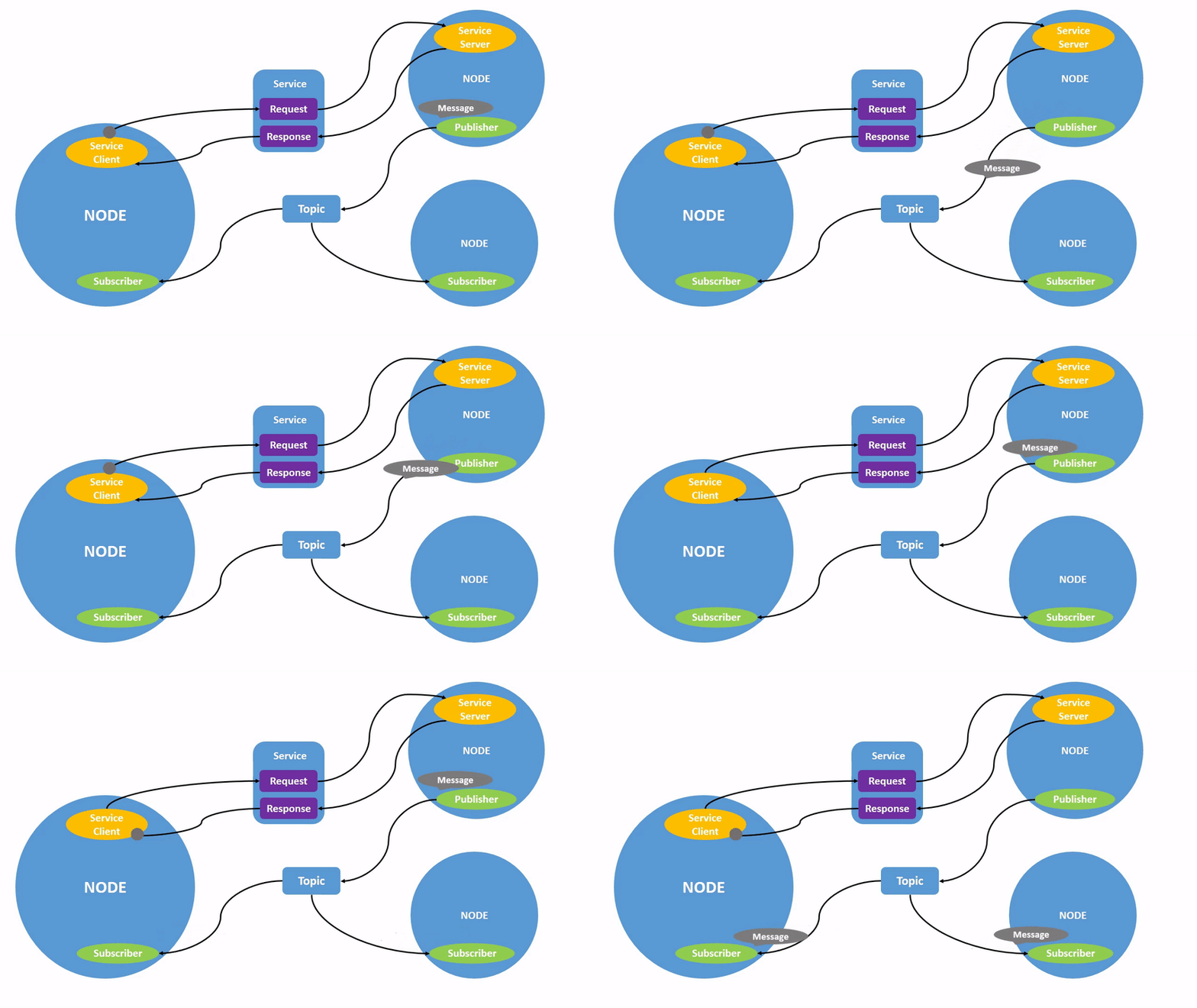
- Node 확인을 위해서 아래 명령을 실행해서 turtlesim_node, turtle_teleop_key를 실행합니다.
$ ros2 run turtlesim turtlesim_node
$ ros2 run turtlesim turtle_teleop_key
- 아래 명령을 실행해서 Node 목록을 확인합니다. 방금 실행한 두 개의 Node '/teleop_turtle', '/turtlesim'를 확인할 수 있습니다
$ ros2 node list
- 아래 명령을 실행해서 '/turtlesim' Node의 정보를 확인합니다. '/turtlesim' Node 관련 다양한 정보를 확인할 수 있습니다.
ros2 node info /turtlesim
- 아래 명령을 실행해서 rqt_graph를 실행합니다. 두 Node '/teleop_turtle', '/turtlesim'이 어떻게 정보를 주고받는지 확인할 수 있습니다.
$ rqt_graph
3. Package
- Package는 특정 기능을 가진 Node들을 그룹화해서 관리하기 편하도록 하는 단위입니다.
- 아래 그림은 Turtlebot3의 패키지 구조입니다. 기능별로 잘 구성되어 있는 것을 확인할 수 있습니다.

- C 언어로 개발을 위한 ros2 Package를 생성하는 명령을 아래와 같습니다.
$ ros2 pkg create --build-type ament_cmake <PackageName>- Python 언어로 개발을 위한 ros2 Package를 생성하는 명령을 아래와 같습니다.
$ ros2 pkg create --build-type ament_python <PackageName>- 터미널에서 이후 과정 실습을 위해서 작업 공간 'ros_ws' 폴더를 아래 명령을 실행해서 만들고 이동합니다.
$ mkdir -p ~/Workspace/ros_ws
$ cd ~/Workspace/ros_ws
- Package 생성을 위한 'src' 폴더를 아래 명령을 실행해서 만들고 이동합니다.
$ mkdir src
$ cd src
- 아래 명령을 실행해서 Python 언어로 개발을 위한 'ros_tutorial' Package를 생성합니다.
$ ros2 pkg create --build-type ament_python ros_tutorial
- VSCode를 이용해 'ros_ws' 폴더를 열어봅니다. 아래와 같이 'ros_ws/src' 폴더 아래 'ros_tutorial' Package 관련 파일들이 생성된 것을 확인할 수 있습니다.

4. Launch
- 하나의 로봇의 기능을 수행하기 위해서는 여러 개의 Node가 실행돼야 할 필요가 있습니다. 매번 많은 Node를 실행하고 중지시키지 않고 한 번의 명령을 필요한 Node들을 실행하고 중지하는 Script 기능이 Launch입니다.
- 우선 'src/ros_tutorial/setup.py' 파일을 아래와 같이 수정합니다. 수정의 의미는 'ros_tutorial' Package 아래 'launch' 폴더 내의 '. launch.py'로 끝나는 모든 파일을 Package에 포함한다는 의미입니다.
import os
from glob import glob
from setuptools import setup

package_name = 'ros_tutorial'

setup(
    name=package_name,
    version='0.0.0',
    packages=[package_name],
    data_files=[
        ('share/ament_index/resource_index/packages',
            ['resource/' + package_name]),
        ('share/' + package_name, ['package.xml']),
        (os.path.join('share', package_name, 'launch'), glob('launch/*.launch.py')),
    ],
    install_requires=['setuptools'],
    zip_safe=True,
    maintainer='cchyun',
    maintainer_email='cchyun@todo.todo',
    description='TODO: Package description',
    license='TODO: License declaration',
    tests_require=['pytest'],
    entry_points={
        'console_scripts': [
        ],
    },
)
- 다음은 'src/ros_tutorial' 아래 'launch' 폴더를 만들고 그 아래 'turtlesim.launch.py' 파일을 만들고 아래와 같이 편집합니다. 파일의 내용은 'turtlesim'과 'rqt_graph'를 동시에 실행하라는 의미입니다.
#!/usr/bin/env python3

from launch import LaunchDescription
from launch.actions import ExecuteProcess
from launch_ros.actions import Node


def generate_launch_description():
    return LaunchDescription(
        [
            Node(
                package='turtlesim',
                executable='turtlesim_node',
                parameters=[],
                arguments=[],
                output='screen'
            ),
            ExecuteProcess(
                cmd=["ros2", "run", "rqt_graph", "rqt_graph"],
                output="screen",
            )
        ]
    )
- 터미털에서 'ros_ws' 폴더로 이동후 아래 명령을 실행해서 컴파일합니다. '--symlink-install' 옵션을 주면 실행에 필요한 파일을 install 폴더에 복사하지 않고 symlink를 생성합니다. script를 수정할 경우 '--symlink-install' 옵션을 주지 않으면 다시 'colcon build' 명령을 실행해야 하고 '--symlink-install' 옵션을 준 경우는 'colcon build' 명령을 실행하지 않아도 바로 반영이 됩니다.
$ cd ~/Workspace/ros_ws
$ colcon build --symlink-install
- VSCode에서 확인하면 'build', 'install', 'log' 3개의 폴더가 추가된 것을 확인할 수 있습니다.

- 터미널에서 아래 명령을 실행해서 컴파일된 ros2 환경을 적용합니다.
$ source install/setup.bash
- 아래 명령을 실행해서 'turtlesim.launch.py' script를 실행합니다. 아래 그림과 같이 'turtlesim'과 'rqt_graph'가 동시에 실행되는 것을 확인할 수 있습니다.
$ ros2 launch ros_tutorial turtlesim.launch.py
- 'turtlesim.launch.py'를 실행한 터미널에서 'Ctrl+c'를 2~3차례 누르면 두 개의 프로그램이 모두 종료되는 것을 확인할 수 있습니다.

5. Parameter
- Parameter는 Node의 Configuration 정보입니다. 모는 Node는 각각 자신의 Parameter를 가지고 있습니다.
- Paramter의 자료형은 다음과 같습니다.
◦ integers
◦ floats
◦ booleans
◦ strings
◦ lists - 첫 번째 터미널에서 아래 명령을 실행합니다. 'turtlesim_node'가 실행됩니다.
$ ros2 run turtlesim turtlesim_node- 두 번째 터미널에서 아래 명령을 실행합니다. 'turtle_teleop_key'가 실행됩니다.
$ ros2 run turtlesim turtle_teleop_key- 세 번째 터미널에서 아래 명령을 실행합니다. 아래 그림과 같이 실행 중인 Node의 Parater 목록을 확인할 수 있습니다.
$ ros2 param list
- Node의 특정 Parater 정보를 조회하는 명령은 아래와 같습니다.
$ ros2 param get <node_name> <parameter_name>- 아래 명령을 실행해서 '/turtlesim' Node의 'background_r' 정보를 조회할 수 있습니다. 아래 그림과 같이 'background_r' 값 69가 출력된 것을 확인할 수 있습니다.
$ ros2 param get /turtlesim background_r
- 아래 명령을 실행해서 /turtlesim' Node의 'background_r' 정보를 150으로 변경합니다. 아래 그림과 같이 성공적으로 저장 됐다는 메시지가 출력됩니다.
$ ros2 param set /turtlesim background_r 150
- 아래 그림과 같이 '/turtlesim' Node의 배경이 변경된 'background_r' 값이 반영되어 변경된 것을 확인할 수 있습니다.

- 아래 명령을 실행해서 '/turtlesim' Node의 Parameter 값을 dump 해서 'turtlesim.yaml'에 저장합니다. 'cat' 명령으로 확인해 보면 아래 그림과 같이 'turtlesim.yaml'에 '/turtlesim' Node의 Parameter가 잘 저장된 것을 확인할 수 있습니다.
$ ros2 param dump /turtlesim > turtlesim.yaml
- 'turtlesim.yaml'의 'background_r', ''background_g', ''background_b' 값을 0 ~ 255 사이의 적당한 값으로 변경합니다. 저는 세 가지 값 모두 192로 변경했습니다.

- 아래 명령을 실행해서 변경된 'turtlesim.yaml' 값을 '/turtlesim' Node에 반영합니다.
$ ros2 param load /turtlesim turtlesim.yaml
- 아래 그림과 같이 '/turtlesim' Node의 배경색이 변경된 것을 확인할 수 있습니다.

- 아래 명령을 실행해서 새로운 '/turtlesim' Node가 'turtlesim.yaml' 값을 Parameter값으로 실행되도록 합니다.
$ ros2 run turtlesim turtlesim_node --ros-args --params-file turtlesim.yaml- 아래 그림과 같이 새로운 '/turtlesim' Node가 'turtlesim.yaml' 값을 Parameter값으로 실행된 것을 확인할 수 있습니다.
